SylSmart Standalone Installatie

Maximale controle, minimale installatie

Eenvoudige installatie

Het installeren van SylSmart Standalone is een eenvoudig proces, zo simpel als 1, 2, 3.
Het levert plug-and-play oplossingen, waardoor er geen extra besturingskabels of ingewikkelde instellingen nodig zijn, waardoor de tijd op locatie wordt verkort en de onderbreking voor medewerkers tot een minimum wordt beperkt.

Plug en Play

Oude armaturen verwijderen en nieuwe Standalone draadloze armaturen installeren. Live, aarde en nul aansluiten.

Accessoires

Installeer sensoren, draadloze muurschakelaars en andere accessoires.

Configureer

Gebruik de intuïtieve applicatie die beschikbaar is op zowel Android als IOS om je systeem te configureren.

Voeg armaturen toe en maak uw oplossing op maat

Basisinstellingen

R
Netwerk instellen
R
Koppelen
R

Scène- en timerinstellingen

elektricien die plafondlamp installeert
Zakenman werkt met financiële gegevens. Futuristische 3D-interface boven laptopcomputer. Interactieve financiële diagrammen en digitaal gegevensvisualisatieconcept. Wereldwijde e-business netwerkcommunicatie

Geavanceerde instellingen

R

Daglicht gekoppeld dimmen

R
Circadiaan profiel
R
Aanwezigheidssensor
R
Wandschakelaar instellen

Video handleidingen voor ingebruikname

Basis

White image gallery icon featuring overlapping photo frames with a landscape and sun symbol inside a green circular background.

Personaliseer je scènes door je eigen foto toe te voegen

White fast-forward arrow icon featuring two right-pointing chevrons inside a green circular background, representing progression, advancement, navigation, and forward movement.

Animaties maken
animaties

White focus and targeting icon featuring a central circle surrounded by four corner alignment brackets inside a green circular background.

Verlichting instellen
scènes

White timer and scheduling icon featuring a clock face with a single hand enclosed within a green circular background, representing time management, automation, and scheduled operations.

Maak op tijd gebaseerde
scènes

White window icon featuring a double-pane window frame inside a green circular background, representing residential glazing, windows, and building openings.

Setup
de wandschakelaar

White stopwatch icon featuring a circular timer face and top button enclosed within a green circular background, representing timing, duration tracking, and scheduled processes.

Timers toevoegen
toevoegen

White motion detection icon featuring a person silhouette, wave signals, and a wall-mounted sensor inside a green circular background.

Setup
de aanwezigheidssensor

Geavanceerd

White organizational hierarchy icon featuring a top-level node connected to three lower nodes inside a green circular background, representing structured systems, network architecture, and management hierarchies.

Stel de besturingshiërarchie
in

White smart lighting control icon featuring a power button surrounded by radiating light rays inside a green circular background, representing illumination control, energy management, and lighting activation.

Aan daglicht gekoppelde
diminstellingen

White day-night lighting control icon featuring a crescent moon surrounded by radiating rays inside a green circular background, representing automatic lighting schedules, daylight harvesting, and smart illumination management.

Circadiane
profielen instellen

Uw Smart System is nu klaar voor gebruik

De basisinstallatie van je systeem is nu voltooid. In-/uitschakelen, dimmen of de kleurtemperatuur aanpassen werkt nu met een simpele druk op een knop.
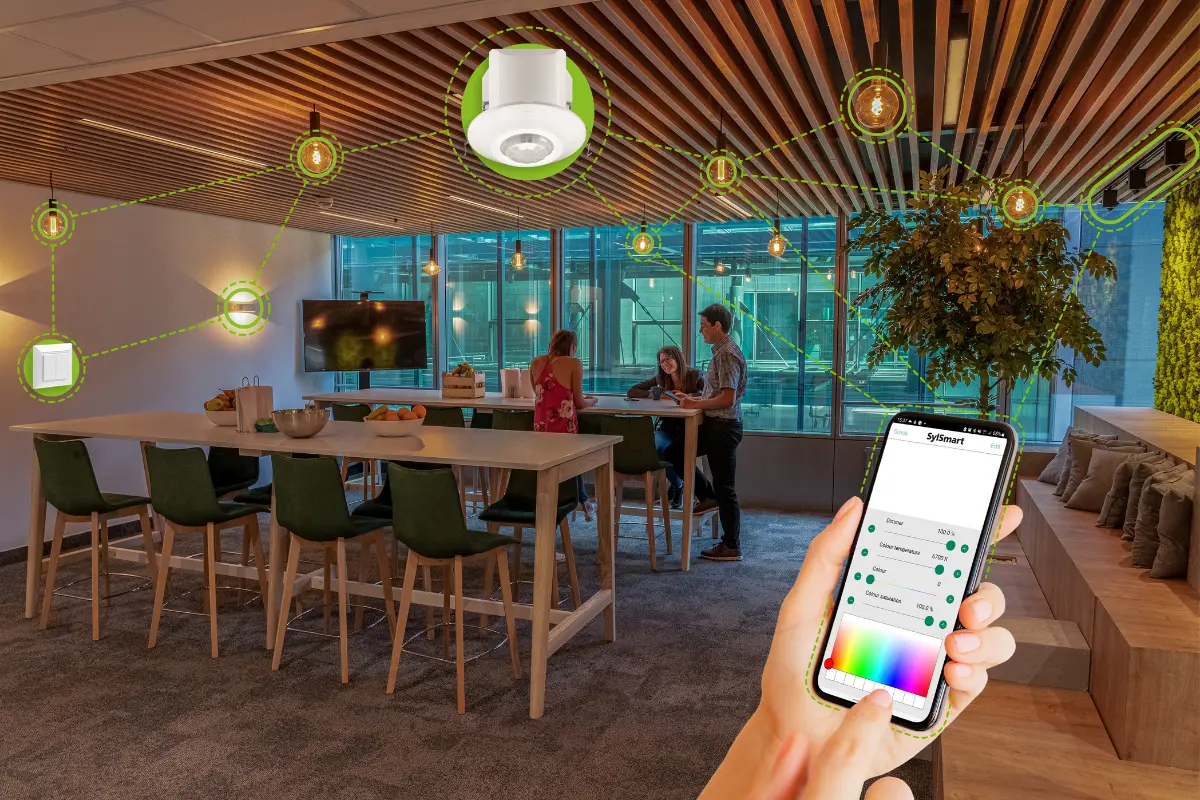
Modern office lounge area with smart lighting system controlled via smartphone, showing connected ceiling lights and devices linked through a digital interface.

We zijn er om je te helpen!

Of je nu een vraag hebt, feedback of hulp nodig hebt, neem gerust contact met ons op.