Instalación de SylSmart Standalone

Máximo control, mínima instalación

Instalación sencilla en 3 sencillos pasos

SylSmart Standalone ofrece soluciones “plug-and-play” que simplifican por completo el proceso de instalación. No requiere cables de control adicionales ni configuraciones complicadas, lo que reduce significativamente el tiempo de instalación en el sitio y asegura una interrupción mínima para tus operaciones y empleados

Technical illustration showing electrical wires being connected to the N (neutral) and L (live) terminals of a wireless smart switch module. Arrows indicate wire insertion points, with a Wi‑Fi symbol and step 1 icon displayed.

Sistema “Plug & Play”

Retira las luminarias antiguas e instala nuevas luminarias inalámbricas autónomas. Solo necesitas conectar fase, tierra y neutro para comenzar a disfrutar de una iluminación moderna y eficiente

Instructional diagram showing electrical wires labeled N and P/L being connected to the top terminals of a recessed smart lighting module. A downward arrow indicates the wiring insertion process, with step 2 and power icons displayed on the left.

Accesorios

Instala sensores, interruptores de pared inalámbricos y otros dispositivos accesorios para mejorar tu sistema de iluminación

Illustration showing a smartphone controlling a wireless wall light switch and ceiling light fixture. Radio signal waves are displayed between the phone and the switch, with Wi‑Fi and step 3 icons on the left side.

Configura de manera intuitiva

Utiliza la intuitiva aplicación disponible tanto en Android como en iOS para configurar tu sistema

Añade luminarias y adapta tu solución

Ajustes básicos

R
Configuración de la red
R
Emparejamiento
R

Ajustes de Escena y Temporizador

electricista instalando luz de techo
Hombre de negocios trabaja con datos financieros. Interfaz 3d futurista sobre ordenador portátil. Diagramas financieros interactivos y concepto de visualización de datos digitales. Comunicación global en red de comercio electrónico

Ajustes avanzados

R

Regulación vinculada a la luz diurna

R
Perfil Circadiano
R
Sensor de presencia
R
Configuración del interruptor de pared

Guías en vídeo para la puesta en servicio

Básico

White image gallery icon featuring overlapping photo frames with a landscape and sun symbol inside a green circular background.

Personaliza el escenario añadiendo tu propia foto

White fast-forward arrow icon featuring two right-pointing chevrons inside a green circular background, representing progression, advancement, navigation, and forward movement.

Crea animaciones
animaciones

White focus and targeting icon featuring a central circle surrounded by four corner alignment brackets inside a green circular background.

Establece la iluminación
escenas

White timer and scheduling icon featuring a clock face with a single hand enclosed within a green circular background, representing time management, automation, and scheduled operations.

Crea escenas basadas en el tiempo

White window icon featuring a double-pane window frame inside a green circular background, representing residential glazing, windows, and building openings.

Configuración
el interruptor de pared

White stopwatch icon featuring a circular timer face and top button enclosed within a green circular background, representing timing, duration tracking, and scheduled processes.

Añadir temporizadores
add

White motion detection icon featuring a person silhouette, wave signals, and a wall-mounted sensor inside a green circular background.

Configuración
el sensor de presencia

Avanzado

White organizational hierarchy icon featuring a top-level node connected to three lower nodes inside a green circular background, representing structured systems, network architecture, and management hierarchies.

Configura la jerarquía de control

White smart lighting control icon featuring a power button surrounded by radiating light rays inside a green circular background, representing illumination control, energy management, and lighting activation.

Ajustes de atenuación vinculados a la luz diurna

White day-night lighting control icon featuring a crescent moon surrounded by radiating rays inside a green circular background, representing automatic lighting schedules, daylight harvesting, and smart illumination management.

Configura los perfiles circadianos

Tu sistema SylSmart ya está listo para disfrutar

Con la configuración básica completada, ahora puedes controlar tu iluminación de manera sencilla. Enciende, apaga, atenúa o ajusta la temperatura de color con solo pulsar un botón.
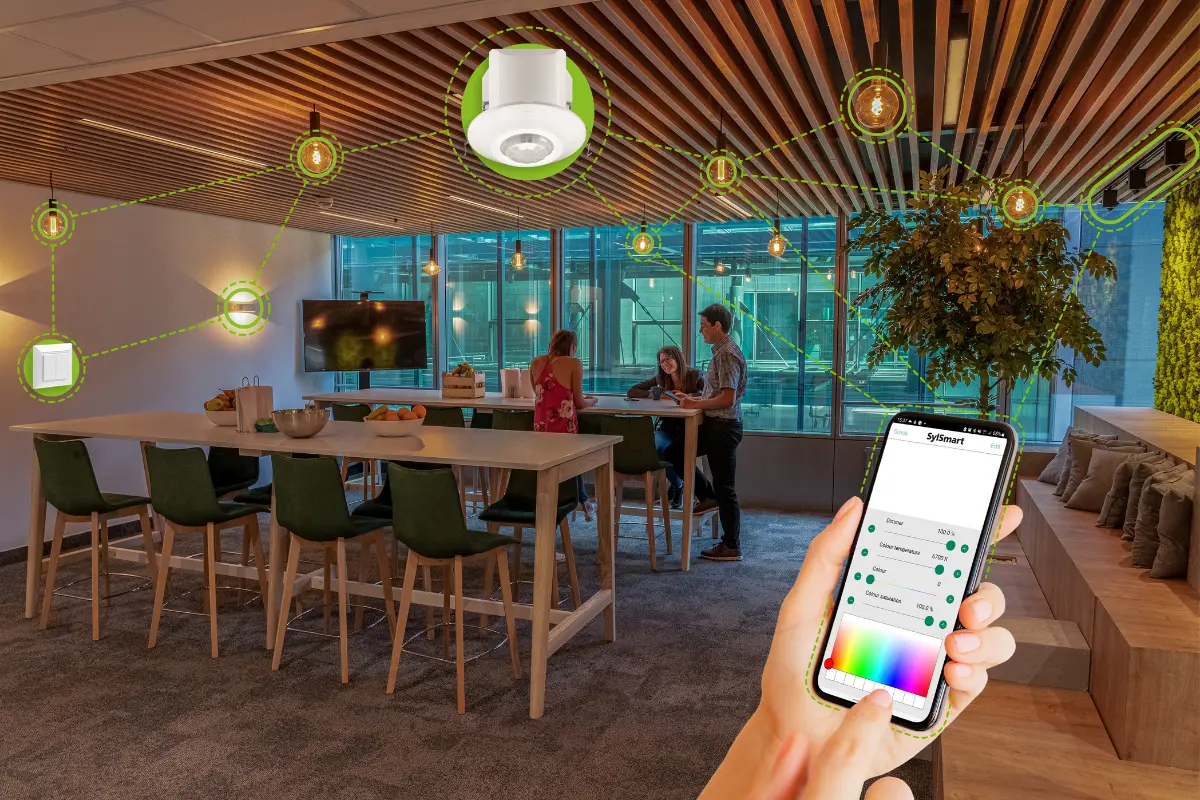
Modern office lounge area with smart lighting system controlled via smartphone, showing connected ceiling lights and devices linked through a digital interface.

¡Estamos aquí para ayudarte!

Si tienes alguna pregunta, comentario o necesitas ayuda, no dudes en ponerte en contacto con nosotros.